
Sub-Total: $0.00
How to Use FlashBack
Step-by-Step Instructions to Creating a Living Memorial
FlashBack was designed to be simple, intuitive, and durable — so families can focus on honoring their loved ones, not learning complicated technology. Follow the steps below to charge, record, and mount your FlashBack device at a memorial site.
Step 1: Charge Your FlashBack Device
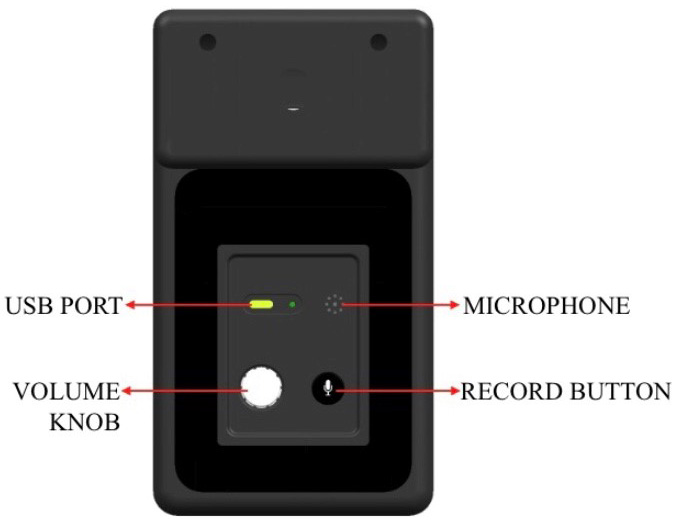
Before using FlashBack for the first time, charge it fully using the included USB cable. This initial charge takes approximately four hours.
Although the device is solar powered for long-term use, a complete USB charge ensures optimal performance right away.
Tip: After the first full charge, FlashBack’s solar panel will keep the device charged — even after hundreds of plays.
Step 2: Record a Personal Message
1. Briefly press the RECORD button to begin
2. Speak clearly into the microphone — share a eulogy, life story, or personal message
3. Press the RECORD button again to stop recording
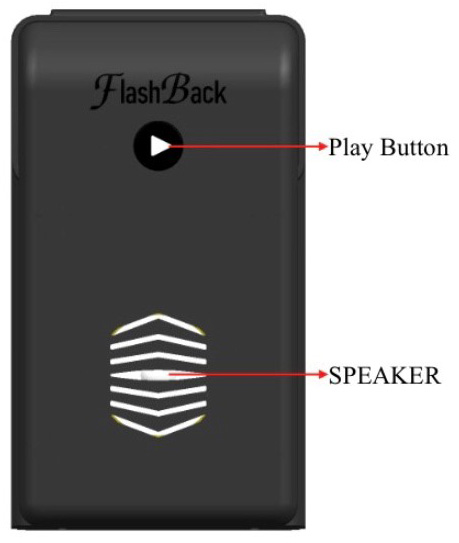
4. Press the PLAY button to listen and review
5. Not satisfied? You can re-record at any time by repeating the steps above
Note: The message will remain saved even after powering off or moving the device.
Step 3: Mount FlashBack to the Monument
FlashBack attaches securely to most standard headstones using a simple clamp mechanism:
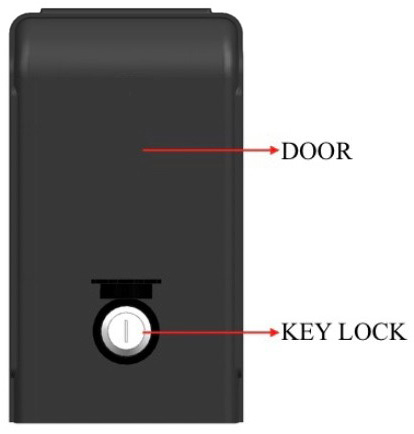
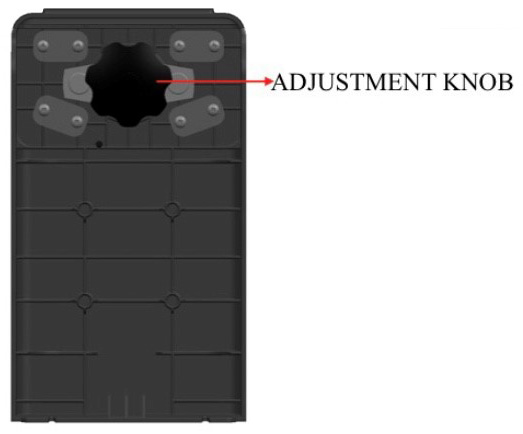
1. Use the provided key to unlock the adjustment compartment
2. Turn the adjustment knob to fit the width of the monument (compatible with markers from 5" to 9¼")
3. Gently place the device over the top or side of the stone
Step 4: Play and Preserve the Memory
Whenever someone visits the gravesite, they can press the PLAY button to hear the message — again and again.
FlashBack’s solar panel keeps it charged over time, even in varied weather conditions. The internal battery supports up to 400 playbacks on a single charge, offering years of use with minimal maintenance.